Blazing Fast Reminder App for iPhone & iPad
Never miss the things that matter.
It won't let you forget.
Keeps nudging until it is done.
Blazing Fast Reminder App for iPhone & iPad
It won't let you forget.
Keeps nudging until it is done.
Most apps remind you once.
Oya keeps reminding you until you’re done.
Highlights
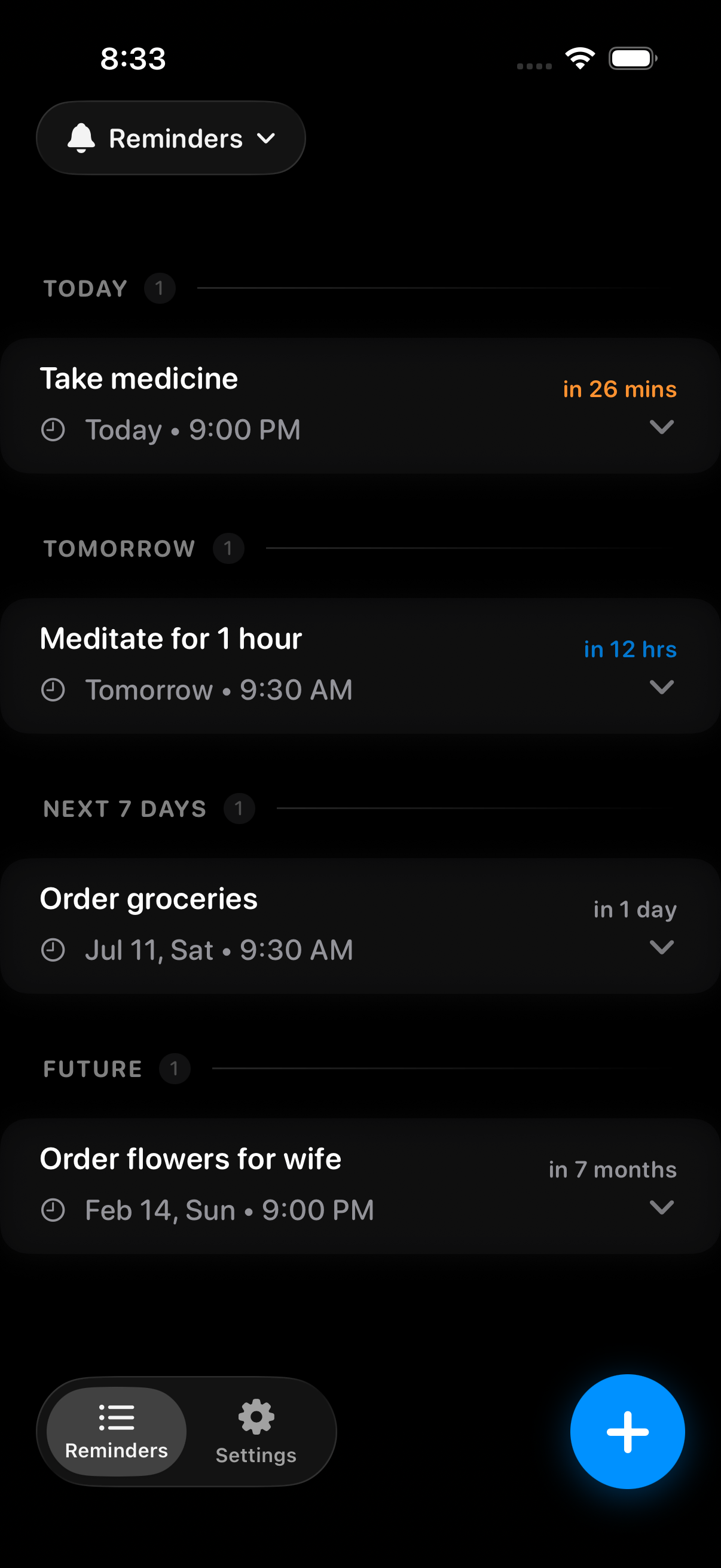
Missed it? Oya reminds you again. Nudges every 1-60 minutes until you mark it done.
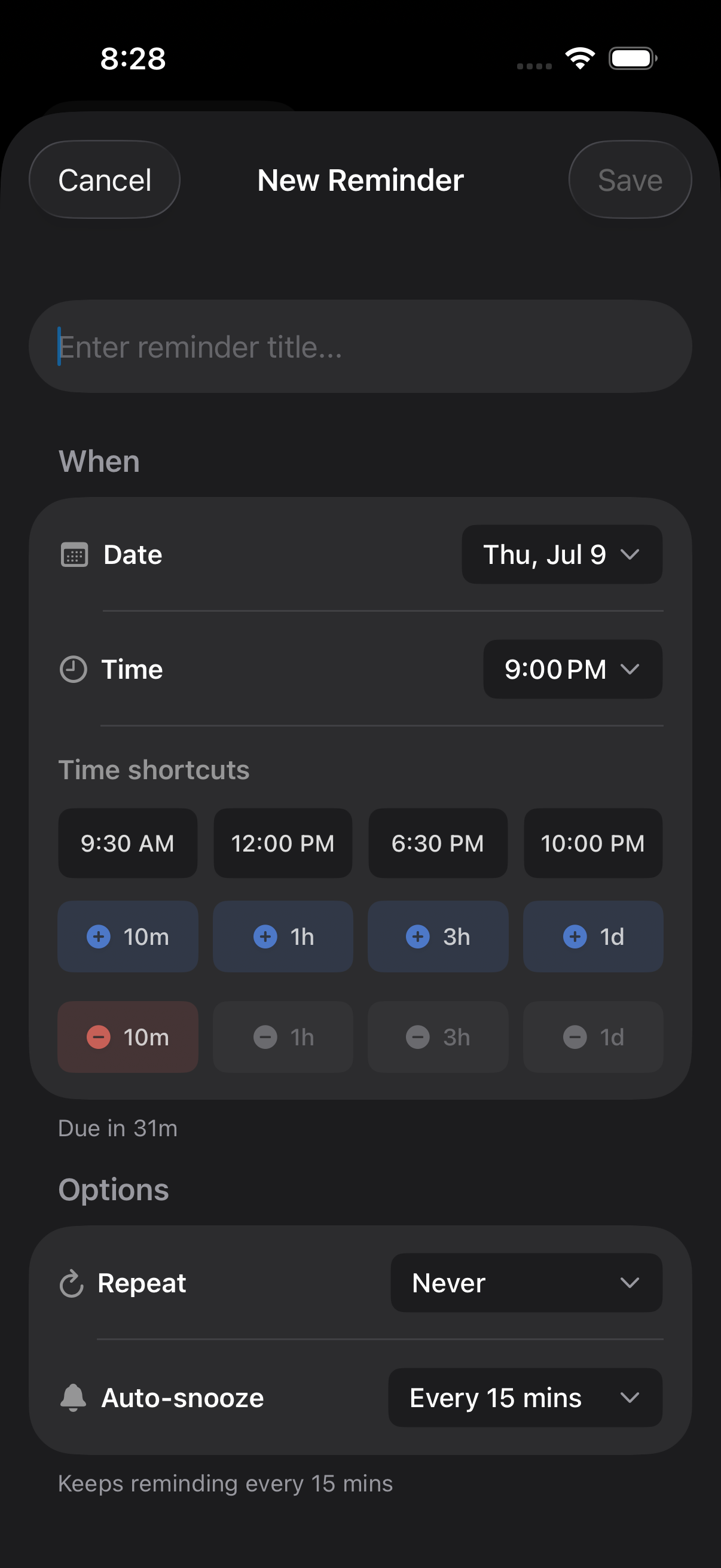
Type it naturally. Oya gets it. Dates, times, and recurring reminders—all figured out for you.
Your reminders stay with you. No cloud. No tracking.
Set it once. Oya remembers the rest. Daily, weekly, monthly–or whenever you need it.
Zero Friction
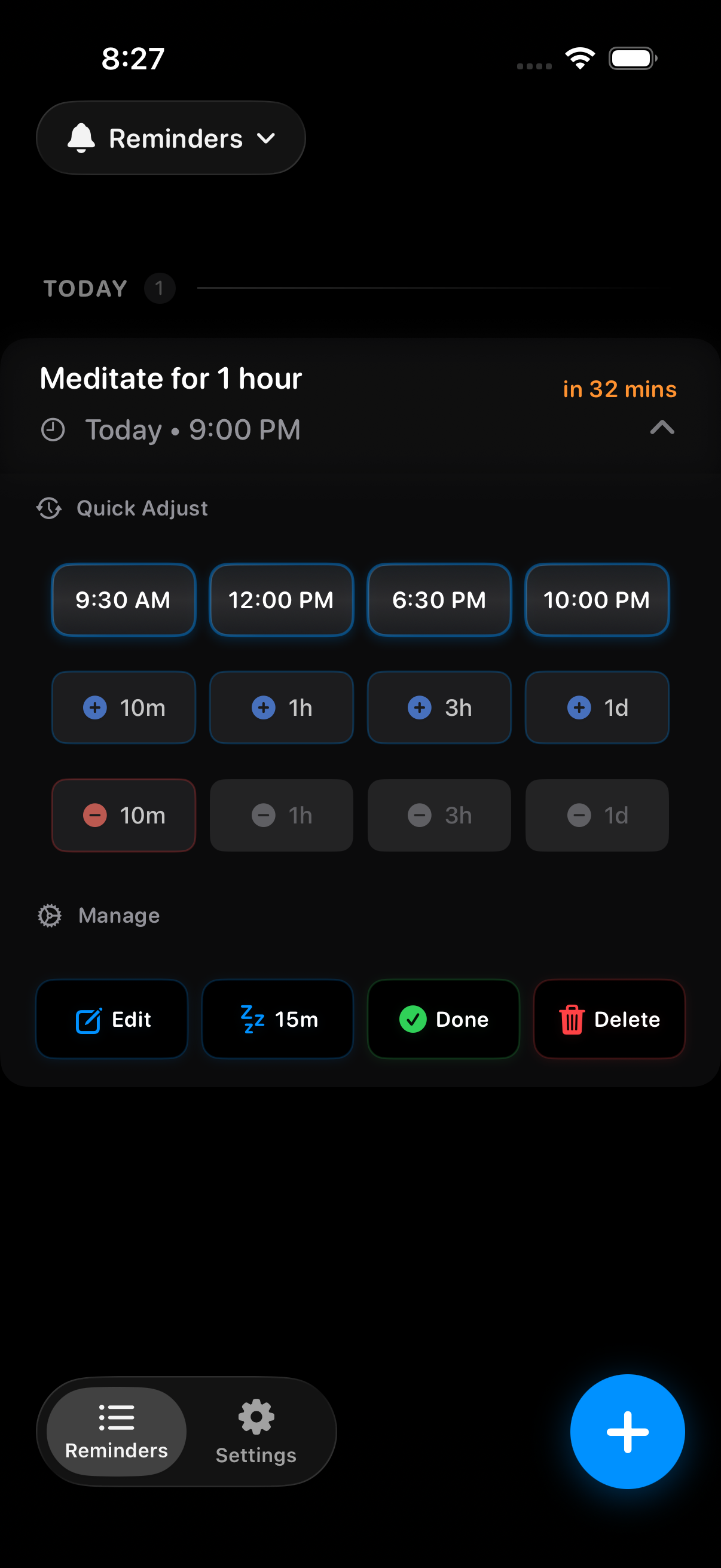
Most apps drop you on their home screen and make you hunt for the reminder. Oya opens directly to it—already in action mode. Snooze right from the lock screen without opening the app, or tap in to quick-adjust the time, mark done, or delete—all from one screen.
Who It’s For
Medication. Bills. Appointments. Anything important. Set a tight interval, and Oya comes back every 5 minutes if you want—until you've marked it done.
ADHD, time blindness, or simply a busy day. Oya stays on it, as often as you need, until you've dealt with it.
We’ve all said it. Oya keeps the pressure on exactly as long as you need. No judgment. Just results.
You don't need a perfect memory.
You need Oya.
Keeps Reminding
Choose how often Oya reminds you—from every minute to every hour–and it keeps nudging until you mark it done. Phone locked? App closed? Doesn't matter. The reminders keep coming without draining your battery.
Forgot your medication? Choose a 5-minute repeat interval and Oya keeps checking in on you every 5 minutes until you've taken it.


Smart Input
Type naturally — “Call Mom tomorrow at 4” or “Pay rent on the 1st of every month.” Oya fills in the date, time, and repeats for you.
Sometimes typing is one step too many. Instead just tap? Need another 10 minutes? Use Time Shortcuts to change the reminder time in a single tap. Choose how often Oya checks in again with you without leaving the screen.
Nudges until you mark it done
Repeats as often as every minute. For when it can't wait.
No sign-in. No cloud. No tracking. Your reminders stay yours.
How It Works
"Take medicine every day at 8" or "Call the dentist tomorrow." Just like that, Oya turns it into a reminder. Date, time, repeats, nudge interval–all sorted.
Medication due? Oya can come back every minute. Waiting to do the laundry? Every hour works just fine. You choose the pace—just tell Oya when to come back.
Stop carrying it in your head. Get on with your day–Oya will be there when its time, even if the app is closed.
One tap, and Oya knows its job is done. If it's a recurring reminder, it'll be back next time—right on schedule.
FAQ
Absolutely. Lock your phone. Put it in your pocket. Oya's still on it. Oya schedules every reminder ahead of time with iOS, so notifications keep arriving even when the app is closed. Your reminder doesn't stop just because your day moves on.
Yes—if you allow Time Sensitive Notifications for Oya when iOS asks. That lets Oya deliver reminders even when Focus is on.
One thing Oya can't do (because no app can) is override your iPhone's mute switch. If your phone is muted, you'll still see the notification and feel the vibration, but there won't be a sound.
Oya comes back—at whatever interval you chose, whether that's every minute or every hour. It keeps reminding you until you mark it done or snooze it to a better time.
After all, a reminder isn't much help if it reminds you only once.
No. Oya is designed to be light on your battery.
It doesn't constantly run in the background, track your location, or rely on a server. Instead, Oya schedules reminders ahead of time using iOS local notifications—the same reliable system your iPhone uses for alarms.
No. No sign-up. No email. No cloud.
Your reminders stay on your device, not on someone else's server. That means there's no account to manage and no reminder data sitting in the cloud waiting to be leaked, sold, or caught up in a breach.
Many are paid for with ads, tracking, or your data. Oya isn't.
Every year, iOS changes. Your subscription helps us keep Oya ready for those changes, so the reminders you rely on keep working. It also means Oya keeps getting better with every release.
Try Oya free for 7 days. If it's not for you, cancel anytime in Settings and pay nothing.
Oya — Persistent Reminders
Free for 7 days. Cancel anytime in Settings — pay nothing.